Taskly
An AI-powered productivity platform designed to help freelancers manage projects, tasks, time, focus, and revenue in one centralized workspace.
Role
UX Researcher / Product Designer
Team
Kate Fretz, Harlene Grewal, Melissa Miranda
Course
DEI 626
Timeline
6 weeks
Platform
Desktop Web App
Project Type
Academic UX Research & Product Design
Focus Areas
Tools
Overview
Taskly is an AI-powered productivity and organization platform designed for freelancers who manage multiple clients, projects, deadlines, tasks, and revenue streams at once.
Freelancers often act as their own project manager, accountant, scheduler, and creative lead. This creates a constant layer of “work about work,” where time is spent organizing tasks, tracking hours, switching between projects, and trying to understand financial progress.
Taskly was designed to reduce this administrative burden by centralizing project management, task planning, focus sessions, time tracking, and revenue analytics into one workspace. The platform uses AI-assisted features to help freelancers stay organized, reduce context switching, and focus on their actual creative work.
The Design Challenge
User Problem
Freelancers often struggle to manage multiple clients, tasks, deadlines, and billable hours across fragmented tools.
Product Problem
Existing productivity tools can support basic task or project management, but they often fail to reflect how freelancers actually work across clients, projects, time tracking, and revenue.
Design Opportunity
Create a centralized AI-powered workspace that helps freelancers plan work, stay focused, track time, and understand project revenue without switching between multiple tools.
How might we design a digital organization and productivity tool that helps freelancers manage projects, track tasks, maintain focus, and monitor revenue in one place?
Project Goal
The goal of Taskly was to design and evaluate a digital productivity tool that enables freelancers to efficiently manage projects, organize tasks, track time, reduce context switching, and monitor revenue.
Our research objective was to evaluate how effectively freelancers could complete key workflows — managing projects and clients, creating tasks, using focus mode, logging actual hours, and locating revenue information.
Centralize freelance work
Bring projects, tasks, clients, revenue, and productivity data into one workspace.
Reduce context switching
Support deep work through Focus Mode and workflow tracking.
Improve financial visibility
Help freelancers understand anticipated revenue, tracked revenue, and project progress.
Support efficient planning
Make task creation, scheduling, and workload management faster and easier.
Target Users
Built for active freelancers juggling multiple clients and projects.
Primary User
Freelance Designer
A creative freelancer managing multiple client projects, deadlines, meetings, invoices, and task lists.
Needs
- A centralized workspace for projects and clients
- Easy time tracking for billable work
- Clear task scheduling and prioritization
- Visibility into revenue and project progress
Pain Points
- Switching between too many tools
- Forgetting to log time accurately
- Difficulty tracking work across clients
- Feeling overwhelmed by scattered deadlines and admin tasks
Secondary Users
Independent Pros
Freelance web developers, content creators, marketers, and other independent professionals who balance creative delivery with operational work.
Research Questions
How do freelancers currently organize, track, and prioritize work across multiple clients and projects?
What challenges and frustrations do freelancers experience with existing productivity and workflow management tools?
How are current productivity tools designed to support freelancer workflows, and what gaps or opportunities exist in the market?
What features and AI-assisted capabilities would freelancers find most valuable in a digital productivity and workflow planning tool?
Project Timeline
A focused six-week research and design sprint.
Week 1
Research
Conducted market, competitor, and user research to validate the problem space and identify key freelancer pain points.
Week 2
Low-Fidelity Design
Developed low-fidelity wireframes to explore layout structure, user flows, and information hierarchy.
Week 3
Mid-Fidelity Prototype
Created an interactive prototype and refined core workflows. Informal internal testing validated functionality before formal testing.
Week 4
Usability Testing
Designed and conducted moderated usability testing sessions to evaluate task efficiency, usability, and user confidence.
Week 5
Analysis & Iteration
Analyzed qualitative and quantitative findings and implemented design changes to address usability issues.
Week 6
Final Prototype & Presentation
Finalized the prototype and developed presentation materials to communicate research insights and design outcomes.
My Role
What I did across research and design.
As part of the Taskly team, I contributed to both the UX research and design process, helping move the project from early concept development to usability testing and final prototype iteration.
Product Features
One workspace for every part of the freelance workflow.
Centralized Dashboard
A home base for active projects, pending tasks, today's priorities, time saved, and productivity progress.
Project Management
Create, organize, and monitor projects with client information, deadlines, anticipated hours, rates, and progress.
Task Management
Supports task creation, prioritization, scheduling, filtering, and task completion workflows.
Focus Mode
A dedicated deep-work space to start sessions, pause work, log context switches, and track time spent on tasks.
Time Tracking
Log actual hours compared to estimated hours, helping freelancers improve planning and billing accuracy.
Revenue Analytics
Displays anticipated revenue, tracked revenue, revenue progress, and financial insights by project or client.
AI Assistance
Provides AI-powered task suggestions and productivity support designed to reduce administrative effort.
Design Process
From user flows and paper wireframes to a tested, high-fidelity prototype.
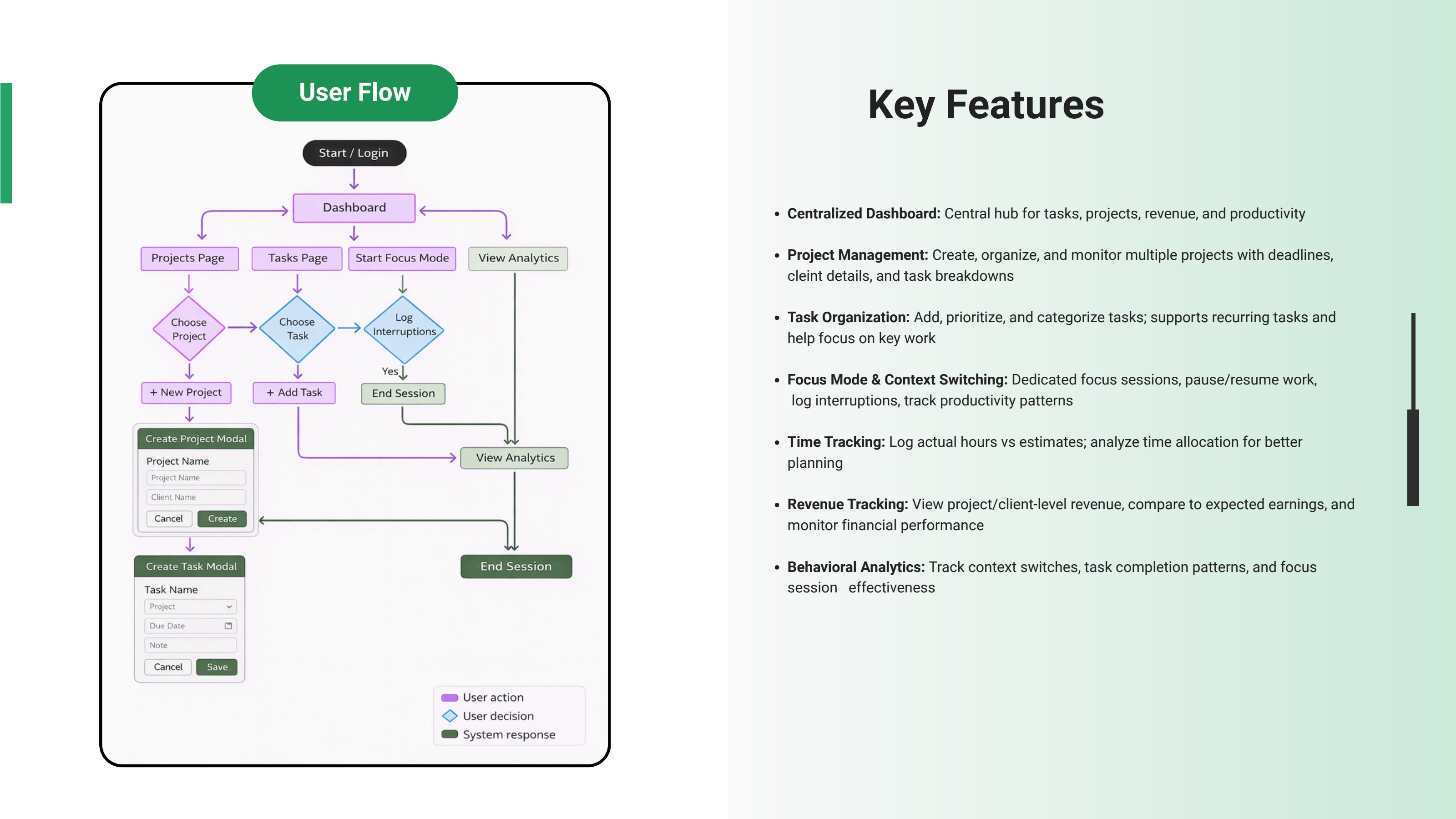
User Flow
We mapped the core user flow from login to dashboard, projects, tasks, focus mode, analytics, and session completion. This helped us understand how different workflows connected and where users would need clear navigation.
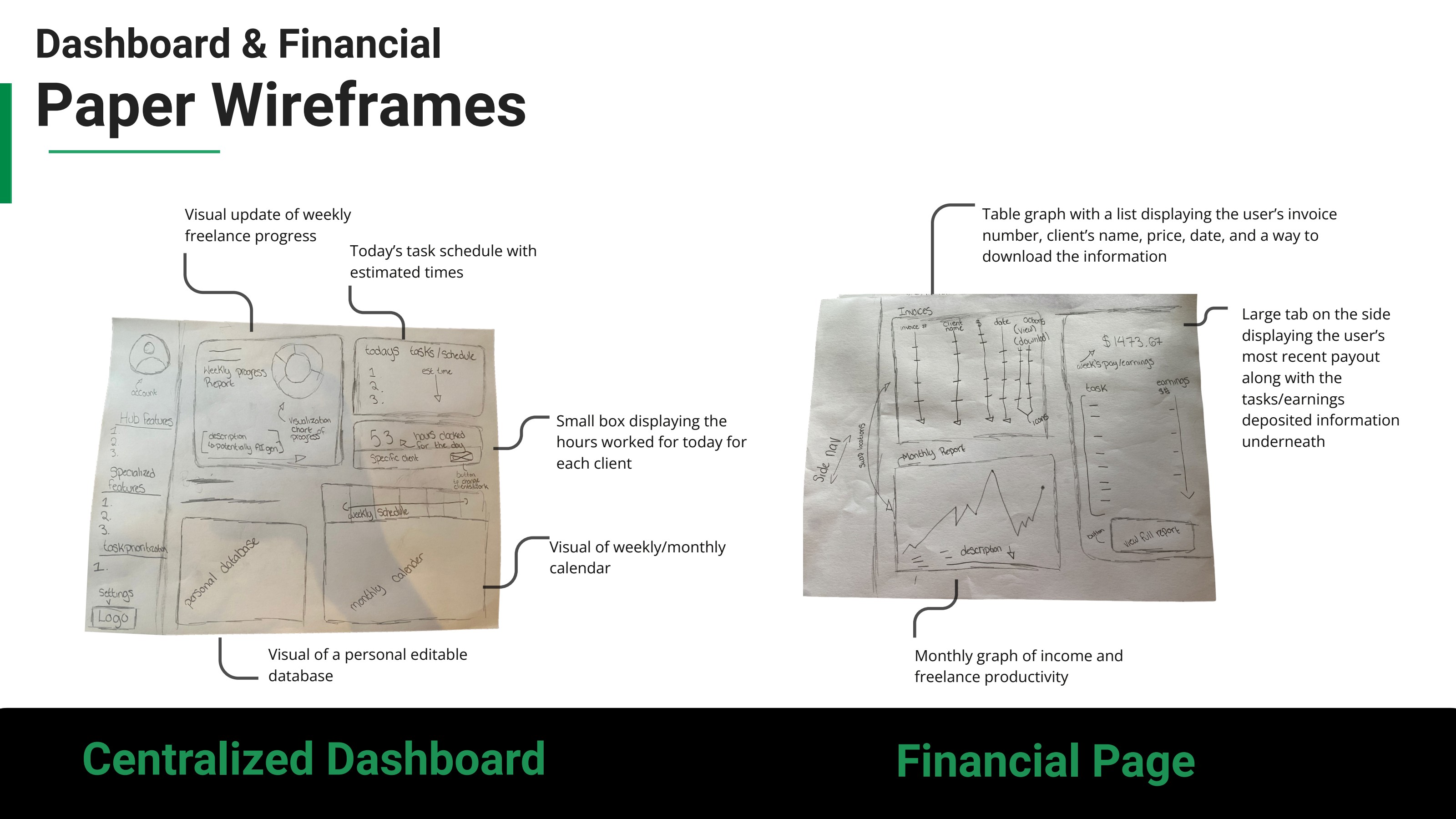
Paper Wireframes
We sketched early dashboard, financial, scheduling, and task manager layouts to explore structure before digital design — thinking through what freelancers need to see first: tasks, revenue, calendar views, progress, and upcoming deadlines.
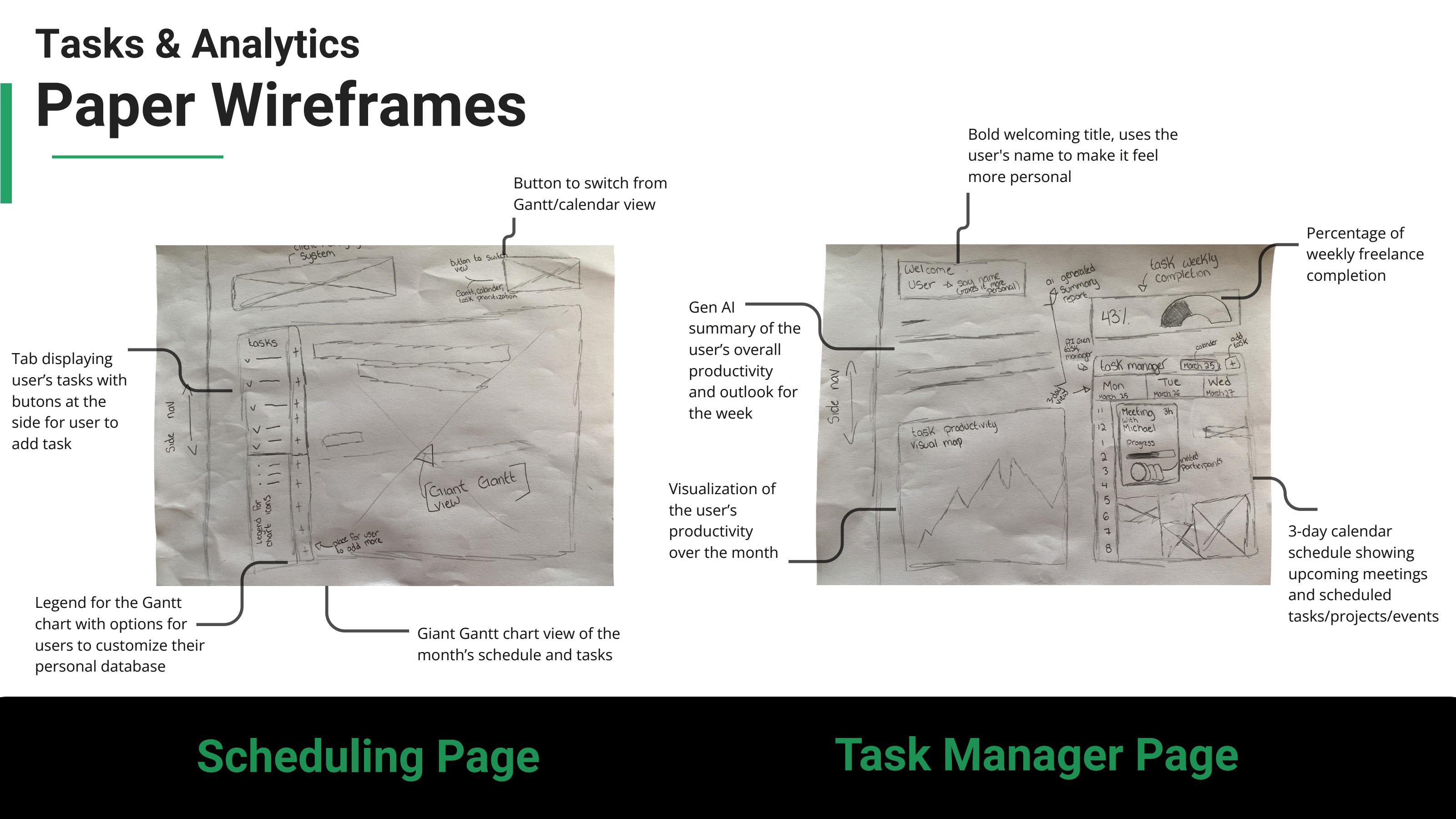
Tasks & Analytics Wireframes
Scheduling and task manager wireframes explored a Gantt/calendar toggle, customizable legends, AI-generated productivity summaries, and a 3-day schedule of upcoming meetings and tasks.
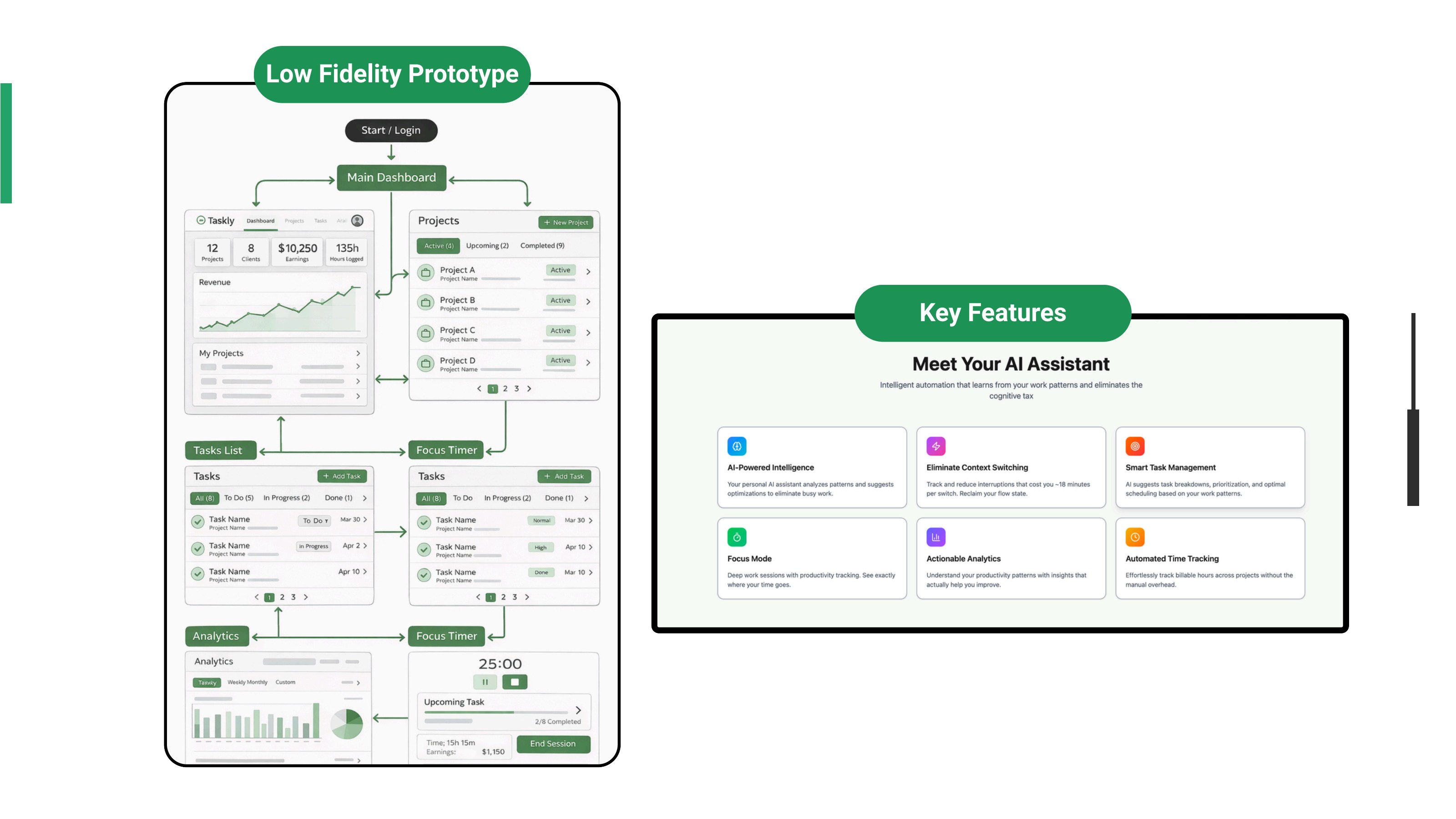
Low-Fidelity Prototype
We created a low-fidelity prototype to map the product's core navigation and validate the overall structure of Taskly before investing in high-fidelity visuals.
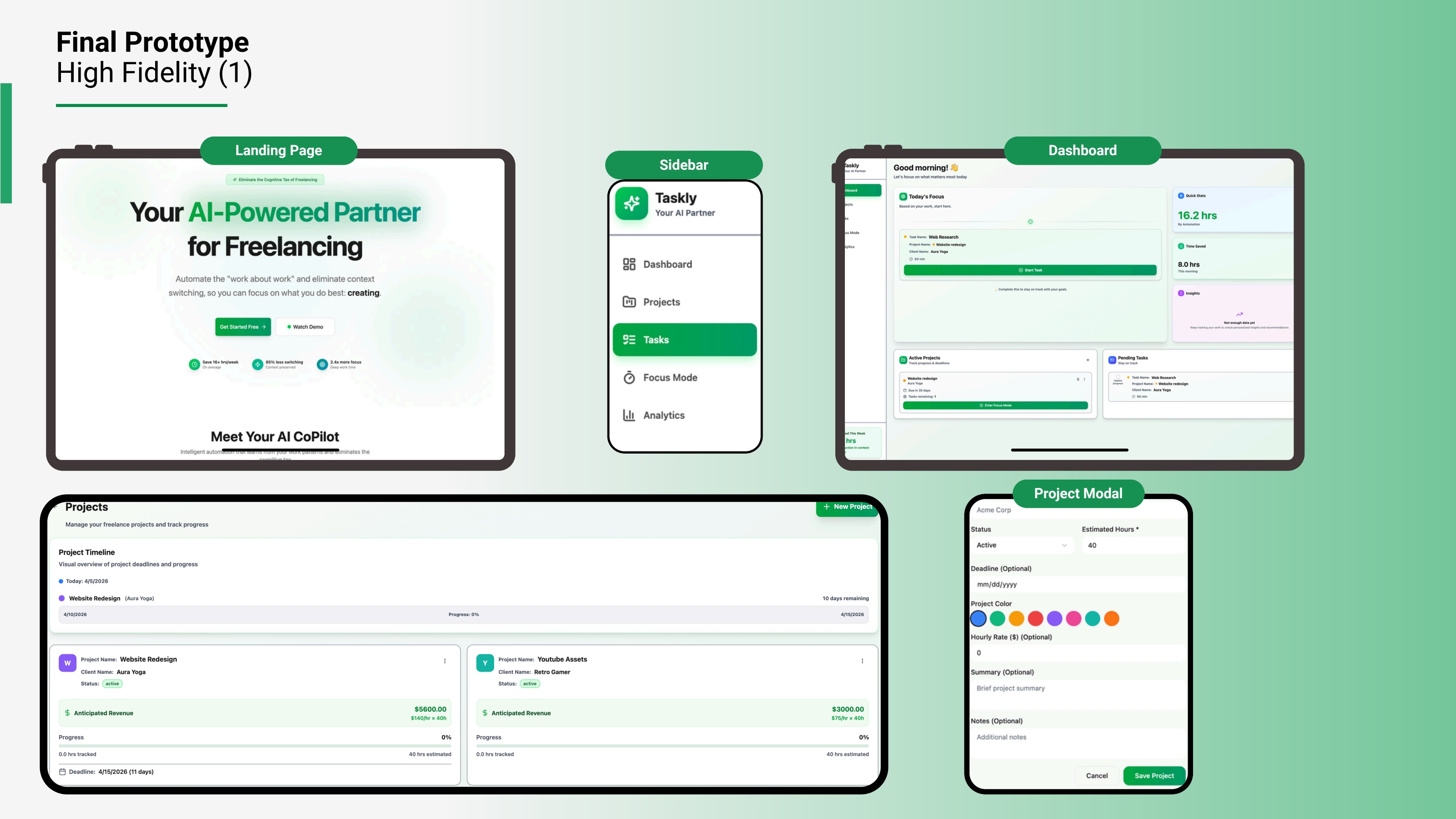
High-Fidelity Prototype 1
The first high-fidelity prototype included a landing page, dashboard, project page, task page, project modal, task modal, focus mode, and analytics tabs — the foundation we took into usability testing.
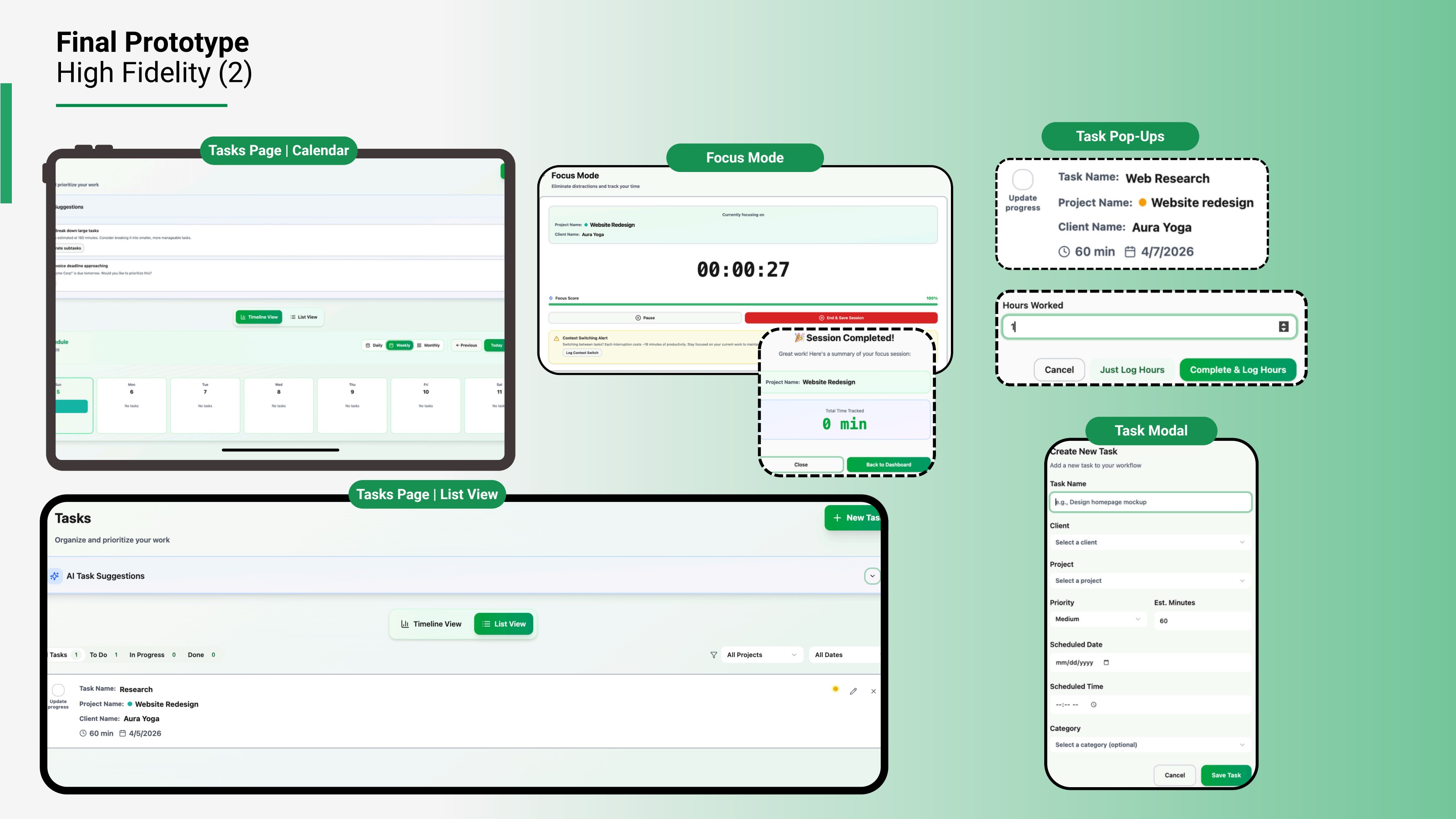
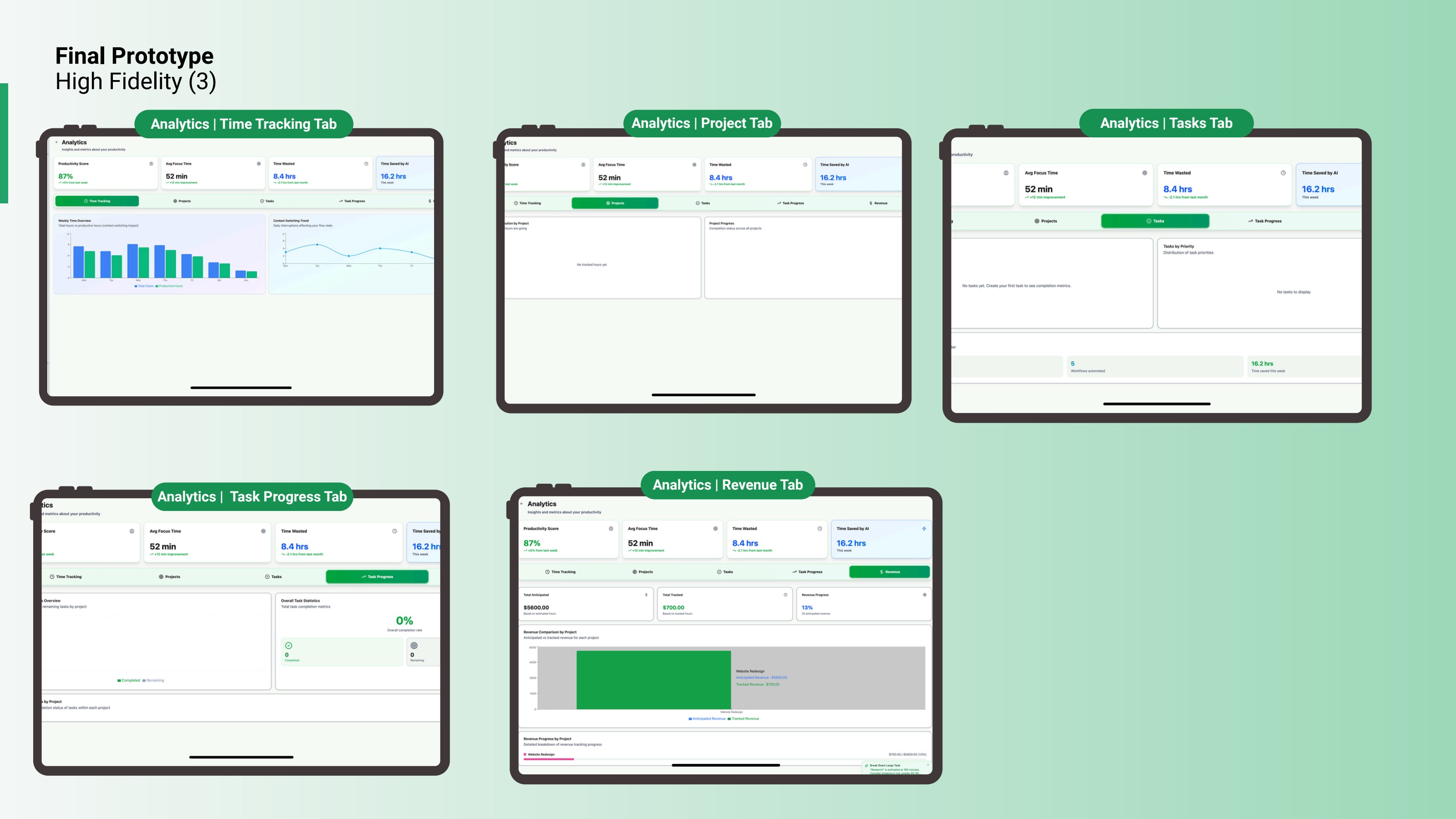
Final Prototype
We revised the interface based on testing feedback, improving visual hierarchy, terminology, affordance, task workflows, focus mode clarity, and analytics readability.
Usability Testing
Moderated one-on-one sessions with active freelancers.
To evaluate Taskly, we conducted moderated one-on-one usability testing with freelancers who regularly manage multiple clients and projects.
Participants
- 5 participants, ages 20–35
- Active freelancers managing multiple clients
- UX & graphic design, web development, content, marketing
- Used Notion, Trello, ClickUp, and Google Workspace
- Familiar with at least one AI productivity tool
Testing Methods
- Moderated usability testing
- Task-based scenarios
- Post-test moderated interviews
- Notes and recordings
- Quantitative & qualitative analysis
Metrics
- Task success
- Time on task
- Confidence scores
- Mistakes & hesitation points
- Observed friction
- Follow-up interview feedback
Task Scenarios
Five task-based scenarios drove the moderated sessions.
Create Projects
Participants created new projects from a client briefing sheet — testing navigation clarity, form usability, and the efficiency of multi-step setup.
Add Tasks
Participants added tasks from a Tuesday schedule — testing task creation workflows, input clarity, and repetitive task entry.
Focus Mode & Context Switching
Participants started Focus Mode, paused a session, and logged a context switch — testing discoverability, feature clarity, and workflow tracking.
Task Management & Updates
Participants filtered tasks by project, marked tasks complete, and updated actual hours — testing task management, time logging, and progress updates.
Revenue Analytics
Participants located anticipated revenue, tracked revenue, and total revenue progress — testing financial visibility and data comprehension.
Testing Outcomes
Success rate, time on task, and confidence per scenario.
Task 1 · Add Projects
4/4
Success
5m 08s
Time
8.5/10
Confidence
Participants found project creation relatively easy with little friction.
Task 2 · Create Tasks
4/4
Success
4m 02s
Time
7.5/10
Confidence
Completed, but with confusion around modal labels and contextual guidance.
Task 3 · Focus Mode
4/4
Success
1m 48s
Time
7.5/10
Confidence
Accessible, but users did not always understand or trust its purpose.
Task 4 · Complete & Log Hours
2/4
Success
2m 42s
Time
5.5/10
Confidence
The most friction — especially logging hours and identifying completion actions.
Task 5 · Analytics & Revenue
4/4
Success
0m 58s
Time
7.2/10
Confidence
Quick to access, but some found the page visually overwhelming.
Key Findings
What testing revealed — and the design lesson behind each.
Low Visibility Reduced Discoverability
Users missed key interactive elements because some icons, checkboxes, and input controls were too small or low contrast. Only one participant noticed the calendar icon, which made the date picker feel inconsistent or broken.
Design Lesson
Visibility and affordance are critical for discoverability. Important controls need enough size, contrast, spacing, and visual priority to be immediately recognizable.
Terminology Created Confusion
Participants commented on inconsistent labels such as “Create,” “Add,” “Save,” “Due Date,” “Scheduled Date,” and “Focus Mode.” All participants recommended clearer terminology.
Design Lesson
Language should match user intent. Standardized terminology reduces cognitive load and helps users understand what action they are taking.
Task Tracking Was Not Intuitive Enough
Users struggled to mark tasks complete and log actual hours. The “Log Hours” action felt disconnected from the task context, and the layout did not support quick scanning or planning.
Design Lesson
Core actions should be visible, contextual, and directly tied to the user's workflow.
Focus Mode Needed Clearer Feedback
Users could access Focus Mode but did not fully understand its purpose or value. Some were unsure whether time was automatically logged or whether pausing, ending, and saving meant different things.
Design Lesson
System feedback and clear feature explanations are essential for trust and adoption, especially for new product concepts.
Freelancers Think in Clients, Not Just Projects
Some participants recommended organizing the system around clients first, then projects and tasks. This revealed a mismatch between our structure and the mental model some freelancers use.
Design Lesson
Freelance workflows should reflect client-based organization, not only project-based hierarchy.
Iterative Design Changes
Evidence from testing drove four rounds of refinement.
Improved Visual Hierarchy & Affordance
- Increased size, contrast, and placement of key interactive elements
- Made date picker icons and checkboxes more visible
- Added clearer borders and spacing between sections
- Strengthened hierarchy so users could scan the interface faster
Clarified Terminology & Labels
- Standardized action labels across the product
- Replaced unclear terminology with more intuitive wording
- Changed “Due Date” to “Scheduled Date”
- Used clearer save actions such as “Save Project” and “Save Task”
- Added contextual guidance inside modals
Redesigned Task Usability
- Added a more structured task page layout
- Introduced calendar and list toggle views
- Improved task card clarity
- Added more visible “Log Hours” and “Complete Task” actions
- Made task progress easier to update
Improved Focus Mode Clarity
- Clarified pause, save, and end-session states
- Added clearer session progress indicators
- Explained how tracked hours connect to revenue
- Reduced uncertainty around manual vs. automatic time logging
Final Design Highlights
The polished prototype after usability testing and iteration.
Final prototype after usability testing and iteration.
Taskly centralizes project, task, time, focus, and revenue workflows for freelancers.
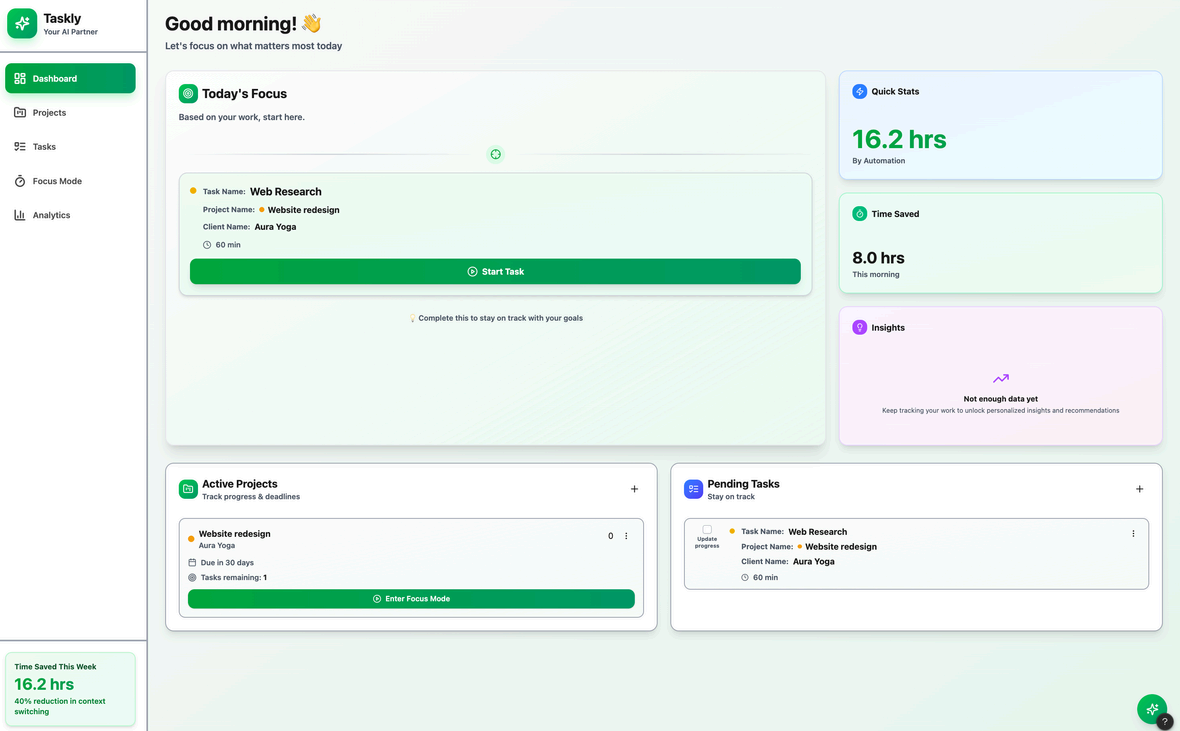
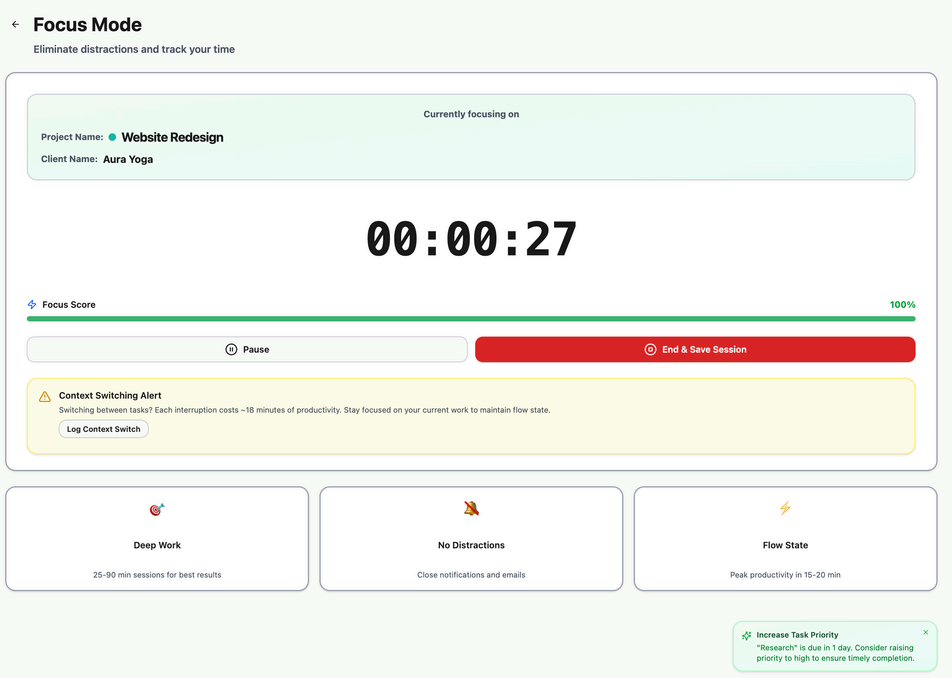
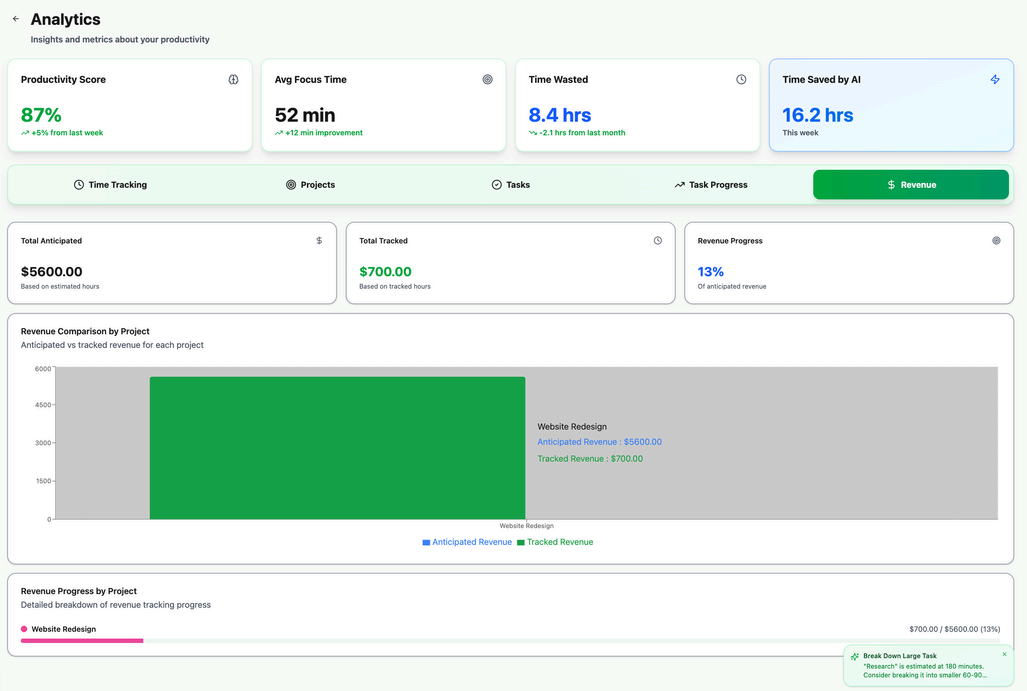
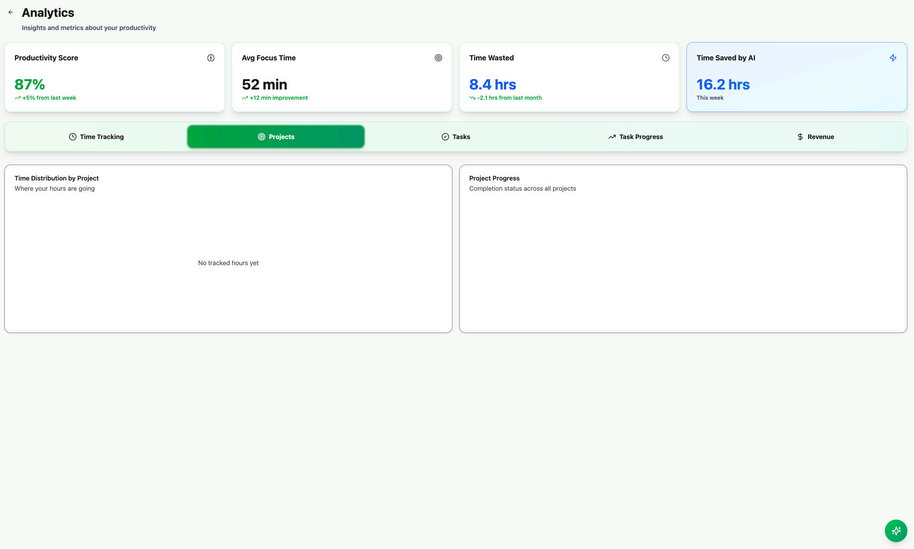
Design updates focused on visibility, clearer language, stronger hierarchy, and more intuitive task actions.
Impact
Framed as UX and product value — this is an academic prototype, not a launched product.
Improved Workflow Clarity
Testing revealed where freelancers struggled, allowing the team to refine labels, hierarchy, and core task flows.
Stronger User Confidence
Iterations focused on reducing uncertainty around task creation, time logging, and Focus Mode.
Better Alignment with Freelancer Needs
Research showed freelancers value integrated time tracking, client context, flexible views, and AI support that is helpful but not intrusive.
Limitations
Because Taskly was developed as an academic prototype, there were several limitations.
Future Improvements
Guided Onboarding
Add a “Guide Queue” or walkthrough to help first-time users understand Taskly's core features faster.
Auto-Labeling
Use predictive autofill and AI-based task labeling to reduce manual admin work.
Client-Centred Organization
Add a dedicated client section so users can organize clients, projects, tasks, and revenue more naturally.
Gantt & Calendar Views
Add timeline planning tools so freelancers can visualize deadlines, progress, and workload across weeks or months.
Automated Asset Management
Attach files such as PDFs, documents, and project assets to clients or tasks, with automatic labeling.
AI-Driven Guidance
Use evidence-based productivity insights to help users understand context switching, time allocation, and focus patterns.
Focus Mode Timeline
Create a session history showing time spent, interruptions, context switches, and billable work summaries.
Reflection
Taskly helped me understand how important usability testing is when designing productivity tools. A feature can seem helpful in theory, but if users do not understand where it is, what it does, or how it benefits them, it will not feel valuable.
One of my biggest takeaways was that clear language, visible actions, and strong information hierarchy are just as important as functionality. Users completed many tasks, but their confidence dropped when terminology felt unclear or when key actions lacked visibility.
This project also showed me how freelancers think differently from general productivity users. Their workflows are tied closely to clients, billable time, project progress, and financial clarity. If I continued this project, I would focus on client-centred organization, stronger onboarding, clearer Focus Mode value, and longer-term testing with freelancers using the tool in real work contexts.
Skills Demonstrated
Taskly reflects my interest in designing tools that reduce cognitive load, support real workflows, and help people spend less time managing work and more time doing meaningful work.